30 Docker Interview Questions and Answers (2026)
If you have a Docker interview coming up, most prep articles won't help much. You get definitions and command lists, but not much sense of what interviewers actually test. This guide covers Docker interview questions that come up at every level, with answers written so you can explain them in your own words, not recite them.
Docker is now standard in DevOps and data engineering roles, showing up in job descriptions alongside Python and SQL, with container adoption now reported across 52% of organizations for most or all of their applications, according to the 2025 CNCF Annual Survey. Dataquest's Docker Fundamentals course teaches the exact patterns this guide covers: containerizing data workflows, building multi-service pipelines with Compose, and production-ready practices like health checks and secret management. It's part of the Data Engineer Career Path if you want structured practice alongside this prep.
Table of Contents
- Essential Docker Interview Questions for Beginners
- Intermediate Docker Interview Questions
- Advanced Docker Interview Questions
- Scenario-Based Docker Interview Questions
- Docker for Data Engineers: What Interviewers Test
- How to Prepare for Your Docker Interview
- FAQs
Essential Docker Interview Questions for Beginners
These come up in almost every Docker interview. They test whether you understand the concepts behind Docker, not just the commands.
1. What is Docker, and why is it used?
Docker is a platform for packaging applications into containers: isolated environments that include everything the app needs to run, including code, dependencies, and configuration. The core problem it solves is environment inconsistency. A script that works on your laptop breaks on a server because of a different Python version or a missing library. Docker greatly reduces that inconsistency. For data engineers, it means an ETL pipeline behaves the same on your machine, a teammate's machine, and in production, even if there are still edge cases to watch for.
2. What's the difference between a Docker image and a Docker container?
This is a simple question on the surface, but many candidates blur the distinction. An image is a static blueprint. It contains everything needed to create a running environment but doesn't do anything by itself. A container is what you get when you run that image: a live, isolated process. One image can produce many containers running simultaneously. Think of an image as a recipe and a container as the meal made from it.
3. How does Docker differ from a virtual machine?
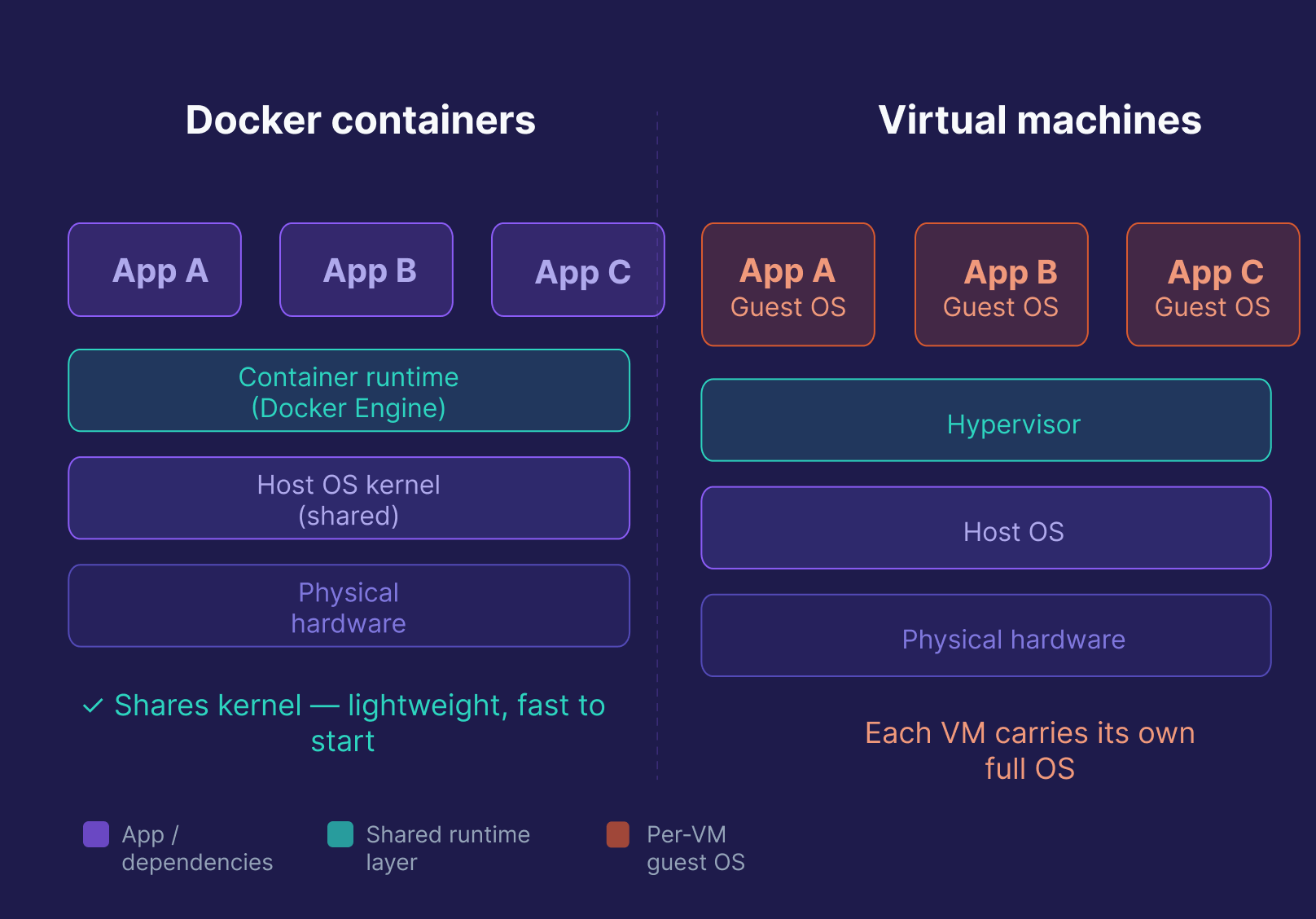
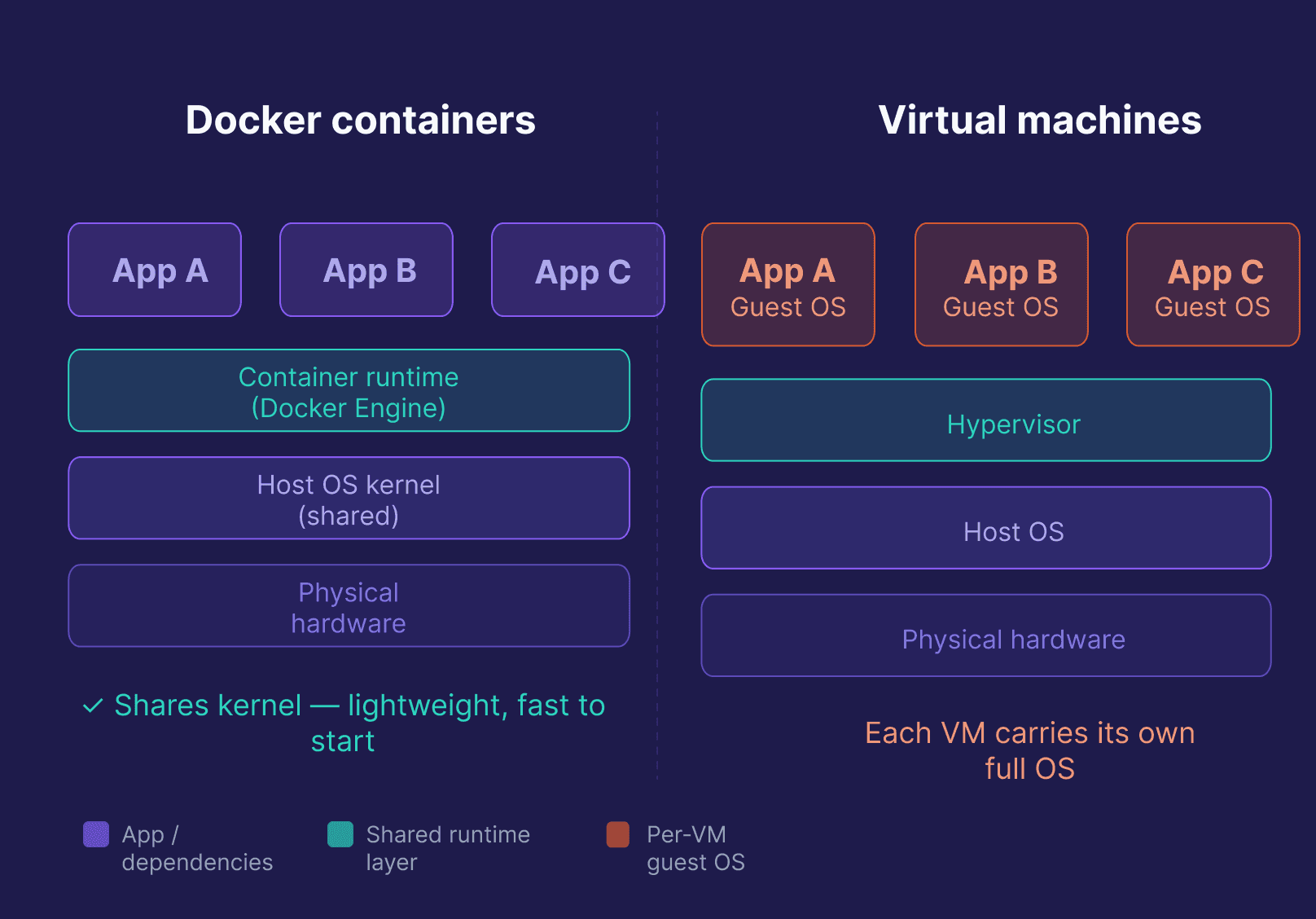
Both isolate applications, but at different levels. A VM runs a full, separate OS on top of a hypervisor, which makes it heavy, slow to start, and resource-intensive. A Docker container shares the host OS kernel and only packages the app and its dependencies, making it lightweight, fast to start (seconds, not minutes), and much cheaper at scale. The tradeoff: VMs provide stronger isolation, but modern container isolation (namespaces, cgroups, seccomp) is sufficient for most workloads.
| Feature | Docker Container | Virtual Machine |
|---|---|---|
| OS | Shares host OS kernel | Full separate OS |
| Startup time | Seconds | Minutes |
| Resource usage | Low | High |
| Isolation level | Process-level | Full OS-level |
| Best for | Pipelines, microservices, CI/CD | Full OS isolation, legacy apps |
4. What is a Dockerfile? Walk me through writing one.
A Dockerfile is a text file with instructions Docker follows to build an image. Docker processes the file top to bottom, caching steps as it builds.
FROM python:3.11-slim        # Base image
WORKDIR /app                 # Working directory inside the container
COPY requirements.txt .      # Copy dependencies file first (for layer caching)
RUN pip install --no-cache-dir -r requirements.txt  # Install dependencies
COPY . .                     # Copy the rest of the code
EXPOSE 8000                  # Document the port the app uses
CMD ["python", "app.py"]     # Default command to run
One important detail worth mentioning in an interview: copying requirements.txt before the rest of the code is intentional. Docker caches each layer, so if your code changes but your dependencies don't, Docker reuses the cached install layer and only rebuilds from COPY . . onward. That speeds up repeated builds significantly.
5. What is the difference between COPY and ADD in a Dockerfile?
Both copy files into the image, but ADD does more, and that's usually a reason to avoid it.
COPY does exactly one thing: copies files or directories from your build context into the image. It's explicit, predictable, and the right default.
ADD can do several things: it automatically extracts local .tar archives into the destination directory, it can fetch files from a remote URL, and in recent versions it can also use a Git repository as a source.
# COPY — explicit, recommended
COPY data/ /app/data/

# ADD — use only when you specifically need local tar extraction
ADD pipeline_data.tar.gz /app/data/
The Docker team recommends COPY for most cases. ADD's extra behaviors can produce unexpected results, and fetching from URLs or Git repos at build time creates non-reproducible images. Use ADD only when you specifically need the tar extraction feature.
6. What is Docker Compose, and how is it different from a Dockerfile?
A Dockerfile builds a single image. Docker Compose runs multiple containers together, defining all your services, networks, and volumes in one compose.yaml file.
services:
  web:
    build: .
    ports:
      - "8000:8000"
    depends_on:
      - db
  db:
    image: postgres:15
    volumes:
      - postgres_data:/var/lib/postgresql/data
    environment:
      - POSTGRES_USER=user
      - POSTGRES_PASSWORD=password
      - POSTGRES_DB=mydb

volumes:
  postgres_data:
docker compose up starts everything. docker compose down tears it all down. In data engineering, this pattern is common. A local dev stack might include Airflow, Postgres, and Redis, all defined in one file and started with one command.
7. What is the difference between CMD and ENTRYPOINT?
Both define what runs when a container starts. The difference is that CMD sets a default command that can be fully overridden at runtime, while ENTRYPOINT sets the executable. It always runs, and anything you pass at runtime is appended to it as arguments.
# CMD — fully replaceable at runtime
CMD ["python", "app.py"]
# docker run myimage python other.py → runs other.py, not app.py

# ENTRYPOINT + CMD — entrypoint is fixed, default arg is replaceable
ENTRYPOINT ["python"]
CMD ["app.py"]
# docker run myimage other.py → runs python other.py
The common pattern: use ENTRYPOINT for the executable, CMD for the default argument. To override ENTRYPOINT at runtime, you need the --entrypoint flag explicitly. For many apps, CMD alone is enough. You only need ENTRYPOINT when you want to lock in the executable and treat CMD as default arguments.
8. What is the Docker build context, and why does it matter?
The build context is the set of files Docker sends to the daemon when you run docker build. By default, it's the entire directory you specify, usually . (the current directory).
This matters for two reasons. First, a large build context slows down every build because Docker has to transfer all those files before it starts. Second, files in the build context are accessible to COPY instructions; files outside it are not.
docker build -t my-app .         # context = current directory
docker build -t my-app ./subdir  # context = subdirectory
A .dockerignore file controls what gets excluded from the context, the same way .gitignore works. Excluding .git, test directories, local virtual environments, and build artifacts keeps the context small and builds fast.
9. What is the difference between EXPOSE and publishing ports with p?
EXPOSE in a Dockerfile is documentation. It tells anyone reading the Dockerfile which port the application uses. It does not make the port reachable from outside the container.
pat runtime is what actually publishes the port:
# EXPOSE in Dockerfile — documents port 8000 is used
EXPOSE 8000

# -p at runtime — maps host port 8080 to container port 8000
docker run -p 8080:8000 my-app
A common interview mistake: assuming that EXPOSE is enough to access the app from a browser or another service. It's not. You need -p (or ports: in Compose) to bind the container port to a host port.
10. What is a Docker registry, and what is Docker Hub?
A Docker registry is a storage and distribution system for Docker images. When you run docker pull or docker push, you're talking to a registry.
Docker Hub is the default public registry, free for public images and where most official base images live (python, postgres, nginx, etc.). Alternatives include Amazon ECR, Google Artifact Registry, GitHub Container Registry, and self-hosted options like Harbor. In production, most teams use a private registry so images stay within their infrastructure.
11. What is the Docker daemon, and how does it relate to the Docker client?
The Docker daemon (dockerd) is the background service that does the actual work: building images, running containers, managing networks and volumes. It listens for API requests and carries them out.
The Docker client (docker) is the CLI you interact with. When you run docker build or docker run, the client sends that request to the daemon via a REST API. They can run on the same machine, or the client can connect to a remote daemon.
This split matters in interviews because it explains why Docker commands can fail even when Docker "is installed." The daemon might not be running, or permissions might block the client from reaching it.
Intermediate Docker Interview Questions
These test how Docker behaves in a real working environment, and they're common in mid-level DevOps and data engineering interviews.
12. What are Docker volumes, and why use them instead of bind mounts?
Data written inside a container is lost when the container is removed. Volumes fix this by storing data in a location Docker manages on the host, outside the container's filesystem.
docker volume create my_data
docker run -v my_data:/app/data my-python-app
On Linux, Docker stores volumes at /var/lib/docker/volumes/. On macOS and Windows with Docker Desktop, Docker Engine runs inside a lightweight Linux VM, so volumes are managed within that VM and not directly accessible as a host path.
Bind mounts link a specific host path directly into a container. They're useful for development (live code changes without rebuilding), but they depend on your host's directory structure and give the container direct access to host file paths, which is a security concern in production. Volumes are preferred: Docker manages them independently, they're easier to back up, and they don't expose host paths.
13. What is the difference between a bind mount, a named volume, and tmpfs?
All three mount storage into a container, but they serve different purposes:
| Type | Storage location | Persists after container removed? | Use case |
|---|---|---|---|
| Named volume | Docker-managed on host | Yes | Production data, databases |
| Bind mount | Specific host path | Yes (it's the host filesystem) | Local dev, live code reload |
| tmpfs | Memory only | No | Sensitive data, temp files |
docker run --tmpfs /app/tmp my-app # mount tmpfs at /app/tmptmpfs is useful when you need fast, temporary storage that should never touch disk, for example, secrets or intermediate processing data you don't want persisted.
14. How does Docker networking work? What's the difference between bridge and overlay networks?
Bridge is the default. On a user-defined bridge network, containers can communicate using container names as hostnames. In Docker Compose, services on the same app network resolve each other by service name automatically. Containers on different bridge networks are isolated. Use it for single-host setups.
docker network create -d bridge my-bridge-network
docker run --network my-bridge-network my-app
Overlay enables communication between containers across multiple Docker hosts, which is required for Docker Swarm deployments. Use it for multi-host production setups.
docker network create --scope=swarm --attachable -d overlay my-overlay-networkThere's also host networking (the container shares the host's network stack directly, with no isolation and maximum performance) and none (no networking at all, for fully isolated workloads).
15. How does Docker handle logs, and what are logging drivers?
By default, Docker captures a container's stdout and stderr and stores them in JSON files on the host. That's what docker logs reads from.
docker logs --tail 50 --follow my-containerFor production, the default JSON file driver isn't always appropriate because log files can grow unbounded and fill disk. Docker supports configurable logging drivers that route logs to different backends:
| Driver | Routes logs to |
|---|---|
json-file |
JSON files on host (default) |
journald |
systemd journal |
syslog |
Syslog daemon |
awslogs |
Amazon CloudWatch |
fluentd |
Fluentd aggregator |
none |
Discard all logs |
docker run --log-driver=awslogs \
  --log-opt awslogs-group=my-pipeline \
  my-app
In production, centralized logging (routing all container logs to a service like CloudWatch, Datadog, or an ELK stack) is standard practice.
16. How do you reduce Docker image size?
Three approaches, used together, make the biggest difference:
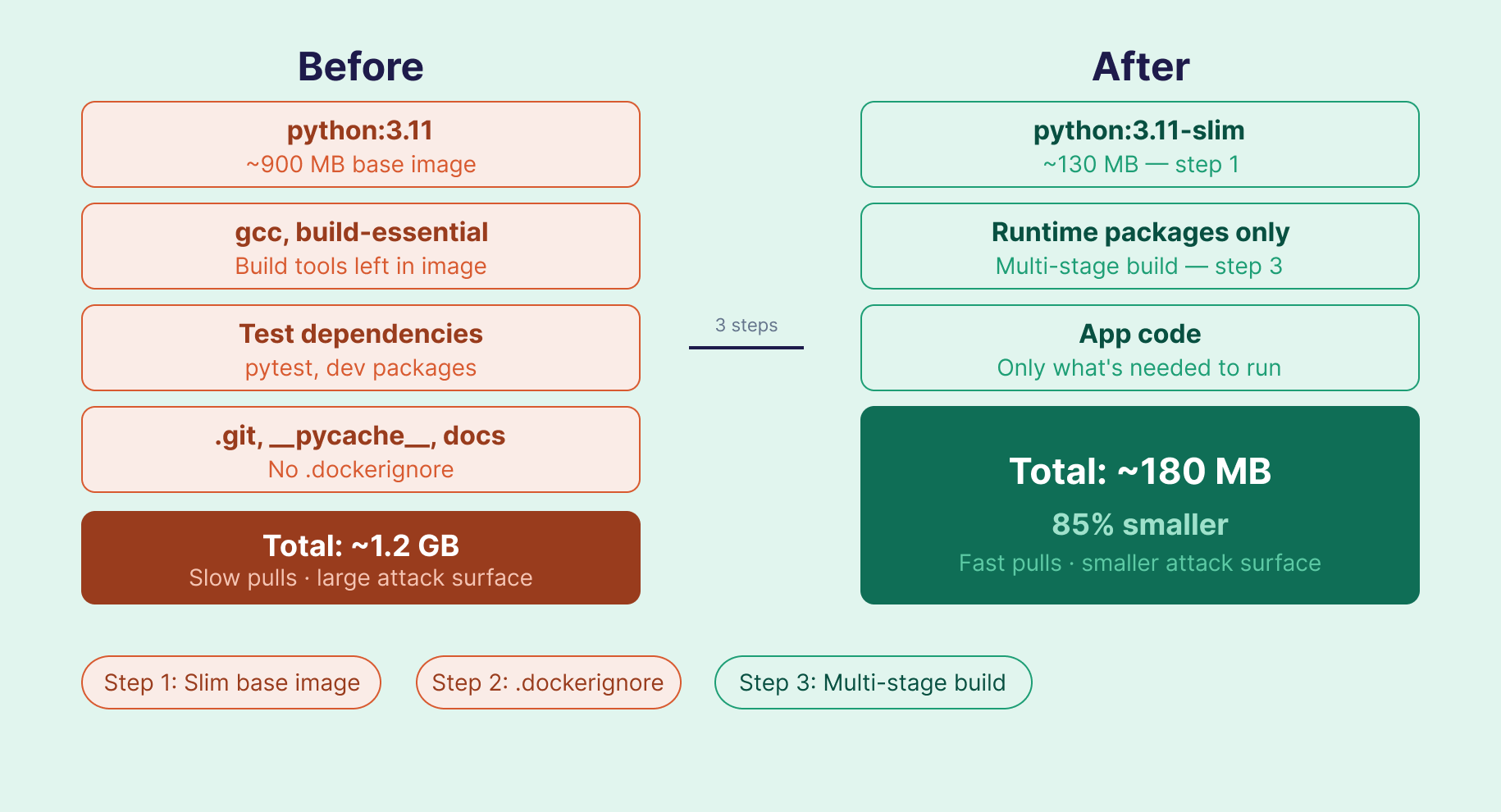
Switch to a minimal base image. python:3.11-slim (~130MB) vs python:3.11 (~900MB). Slim variants strip out most tools not needed at runtime. Alpine images are even smaller, but can introduce compatibility issues with packages that require glibc. Slim is often the safer default for Python.
Add a .dockerignore. Exclude files that don't need to be in the image:
.git
__pycache__
*.pyc
.env
tests/
*.md
Use multi-stage builds. Build in one stage, copy only the output into a slim runtime image. Build tools never make it into the final image:
FROM python:3.11 AS builder
WORKDIR /build
COPY requirements.txt .
RUN pip install --no-cache-dir --target=/build/packages -r requirements.txt

FROM python:3.11-slim
WORKDIR /app
COPY --from=builder /build/packages /usr/local/lib/python3.11/site-packages
COPY . .
CMD ["python", "app.py"]
A 1.2GB image can often come down to under 200MB with steps 1 and 3 alone.
17. What is the Docker build cache, and how do you make builds faster?
Docker caches the result of each instruction as a layer. On subsequent builds, if an instruction and its inputs haven't changed, Docker reuses the cached layer instead of re-running it. A cache miss on any layer invalidates all layers that follow it.
The practical implication: order your Dockerfile instructions from least-changed to most-changed.
# Good: dependencies copied and installed before code
COPY requirements.txt .
RUN pip install --no-cache-dir -r requirements.txt
COPY . .   # cache miss here (code changes often) — doesn't affect the install layer above

# Bad: copying everything first invalidates the install cache on every code change
COPY . .
RUN pip install --no-cache-dir -r requirements.txt
You can also use BuildKit's inline cache for CI/CD pipelines:
docker build --cache-from my-app:latest -t my-app:new .BuildKit is the default build backend in Docker 23+, so most modern installations get cache improvements automatically. The DOCKER_BUILDKIT=1 environment variable prefix you may see in older tutorials is no longer needed.
18. What is a dangling image, and how do you clean up unused Docker resources?
A dangling image is an untagged image layer left behind when you build a new image with the same name and tag. The old layers lose their reference but stay on disk. They accumulate quietly and consume significant space.
docker images -f dangling=true   # List dangling images
docker image prune -f            # Remove dangling images
docker system prune              # Remove all unused containers, networks, images
docker system prune -a           # Remove ALL unused images (use carefully)
In CI/CD pipelines that build images on every commit, dangling images can fill a disk within days. Adding a prune step to your pipeline prevents this.
19. What is the Docker container lifecycle?
A container moves through five states:
| State | Command | What happens |
|---|---|---|
| Created | docker create |
Container is set up from an image but not started |
| Running | docker start / docker run |
Container is executing |
| Paused | docker pause |
Processes are frozen; memory preserved |
| Stopped | docker stop / docker kill |
Container exits; filesystem preserved |
| Deleted | docker rm |
Container and its filesystem are removed |
One distinction worth knowing: docker stop sends SIGTERM, giving the application time to shut down gracefully. docker kill sends SIGKILL immediately, with no cleanup. For data pipelines, graceful shutdown matters if you're mid-write to a database.
20. Can a Docker container restart automatically? What restart policies are available?
Yes, but you have to configure it. The default is no, meaning a stopped container stays stopped.
| Policy | Behavior |
|---|---|
no |
Never restart (default) |
always |
Restart whenever it stops, including on daemon restart |
on-failure |
Restart only on non-zero exit code |
unless-stopped |
Like always, but respects manual stops |
docker run --restart=unless-stopped my-app
docker run --restart=on-failure:3 my-app  # max 3 retries
For production services, unless-stopped is usually the better choice over always. It lets you stop containers for maintenance without them immediately restarting.
21. What are health checks in Docker, and how do you configure one?
A running container isn't necessarily a healthy one. A health check defines a test Docker runs periodically to verify the application is actually working, not just that the process is up.
HEALTHCHECK --interval=30s --timeout=10s --retries=3 \
  CMD curl -f http://localhost:8080/health || exit 1
If this check fails three consecutive times, Docker marks the container unhealthy. Orchestrators like Swarm and Kubernetes use that status to stop routing traffic to the container or restart it.
For data pipelines, health checks solve a common problem: a pipeline container that starts before its database is ready will fail immediately. Combining a health check on the database container with a depends_on condition in Compose prevents that:
depends_on:
  db:
    condition: service_healthy
22. What is image tagging, and why does it matter in production?
Tags identify specific versions of an image: image_name:tag. If you don't specify a tag, Docker uses latest by default.
docker build -t my-pipeline:1.0.0 .
docker build -t my-pipeline:$(git rev-parse --short HEAD) .  # tag with git SHA
Using latest in production is risky. Push a new image with the latest tag and the previous version becomes unreferenced, so you lose rollback ability. With explicit version tags or git SHAs, rolling back means simply deploying the previous tag.
Advanced Docker Interview Questions
These come up in senior interviews and roles with DevOps or platform responsibility.
23. What is Docker Swarm, and how does it compare to Kubernetes?
Docker Swarm is Docker's built-in orchestration tool for managing containers across a cluster of hosts. It's simpler to set up, with basic load balancing and high availability built in.
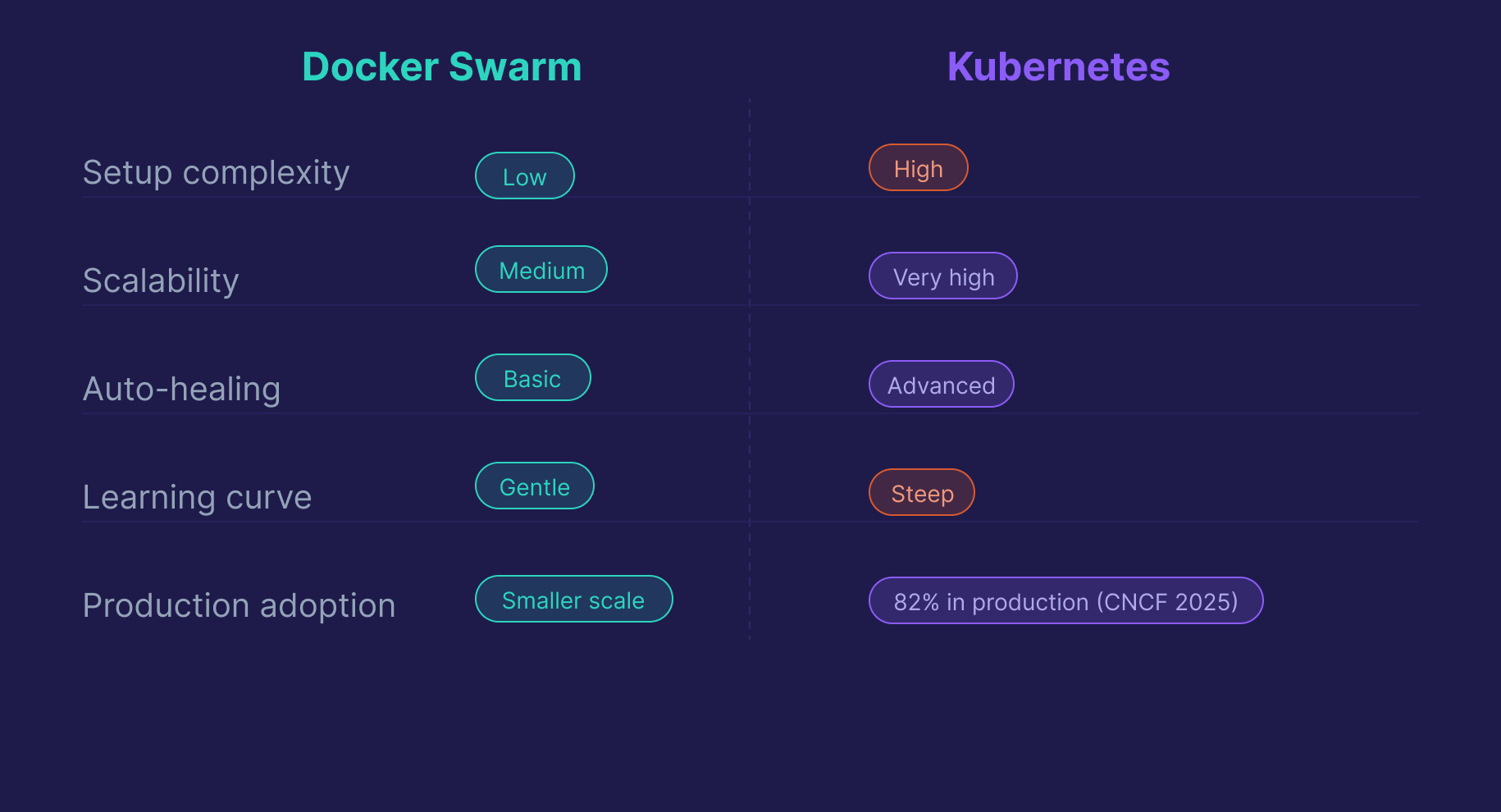
Kubernetes is a separate, more powerful orchestration platform. It handles auto-scaling, advanced scheduling, self-healing, and supports much larger deployments. According to the 2025 CNCF Annual Cloud Native Survey, 82% of container users now run Kubernetes in production, up from 66% in 2023. Docker Swarm remains a valid option for smaller or simpler deployments, but for production-scale roles, interviewers expect Kubernetes familiarity.
| Feature | Docker Swarm | Kubernetes |
|---|---|---|
| Setup complexity | Low | High |
| Scalability | Medium | Very high |
| Auto-healing | Basic | Advanced |
| Learning curve | Gentle | Steep |
| Industry adoption | Smaller scale | 82% production (CNCF 2025) |
24. What are best practices for securing Docker containers?
Security questions come up more often now, especially for DevOps and DevSecOps roles. The practices interviewers expect:
Use minimal base images. Fewer packages means a smaller attack surface. Distroless images (no shell, no package manager) offer the smallest footprint. Slim variants are a practical middle ground.
Run as a non-root user. By default, processes inside containers run as root, which is a significant risk if the container is compromised.
RUN addgroup --system appgroup && adduser --system appuser --ingroup appgroup
USER appuser
Never use the latest tag in production. You lose rollback ability the moment you push a new image with the same tag. Use explicit version numbers or git commit SHAs.
Use Docker Secrets for sensitive data. Environment variables can appear in logs and docker inspect output. Secrets are encrypted and only available at runtime.
Scan images before deploying. Tools like Trivy and Snyk catch known CVEs in your base images and dependencies. Integrating a scan step into CI/CD catches issues before they reach production.
25. What is a multi-stage Docker build, and when should you use it?
A multi-stage build uses multiple FROM statements in a single Dockerfile. Each is a separate stage, and you can copy specific files from one stage to the next. The final image only contains what you explicitly copy into the last stage. Build tools, compilers, and test dependencies never make it in.
# Stage 1: Build
FROM python:3.11 AS builder
WORKDIR /build
COPY requirements.txt .
RUN pip install --no-cache-dir --target=/build/packages -r requirements.txt

# Stage 2: Runtime
FROM python:3.11-slim
WORKDIR /app
COPY --from=builder /build/packages /usr/local/lib/python3.11/site-packages
COPY . .
CMD ["python", "app.py"]
The savings are most dramatic for compiled languages. A Go or Java build stage can include gigabytes of toolchain that never appear in the final image. For Python, the main benefit is excluding build-time dependencies like gcc that some packages need to compile but don't need at runtime.
26. How do you manage secrets in Docker?
Environment variables are common but not secure for production. They show up in docker inspect output and can appear in logs.
.env files are fine for local development. Don't commit them to source control, and don't use them in production.
Docker Secrets is the secure option for Swarm environments. Secrets are encrypted at rest and in transit, mounted as files at /run/secrets/ inside the container, and available only to containers that explicitly need them.
echo "my_db_password" | docker secret create db_password -
docker service create --secret db_password --name my-service my-image
For non-Swarm environments, use a dedicated secrets manager: HashiCorp Vault, AWS Secrets Manager, or GCP Secret Manager.
27. What is the difference between docker exec and docker attach?
docker exec runs a new process inside the container, typically an interactive shell for debugging. This is almost always what you want.
docker exec -it my-container /bin/bashdocker attach connects your terminal to the container's main process (PID 1). If you exit with Ctrl+C instead of Ctrl+P, Ctrl+Q, you'll send a kill signal to the main process and stop the container.
In practice, docker exec is the right tool for debugging. docker attach is only useful when you specifically need to interact with the container's main process stdin/stdout.
28. How do you use Docker in a CI/CD pipeline?
Docker is a natural fit for CI/CD because it guarantees the same environment in every stage of the pipeline. A typical pattern:
# GitHub Actions example
steps:
  - name: Build image
    run: docker build -t my-pipeline:${{ github.sha }} .

  - name: Run tests inside container
    run: docker run --rm my-pipeline:${{ github.sha }} pytest tests/

  - name: Push to registry
    run: |
      docker tag my-pipeline:${{ github.sha }} ghcr.io/myorg/my-pipeline:${{ github.sha }}
      docker push ghcr.io/myorg/my-pipeline:${{ github.sha }}
Tagging images with the git commit SHA gives you full traceability. You can always identify exactly which code version is running in any environment.
29. What is rootless Docker, and when would you use it?
Rootless Docker lets you run the Docker daemon and containers as a non-root user on the host, without requiring sudo or membership in the docker group.
The security benefit is significant: if an attacker escapes a container, they only have the privileges of the non-root user running the daemon, not root on the host. This is especially relevant in shared environments, CI runners, or any context where the principle of least privilege matters.
The tradeoff: rootless mode has some limitations. Certain networking features and storage drivers aren't available, and performance can differ slightly. For most standard workloads it works well. It's increasingly recommended as the default for security-conscious production setups.
30. What are Docker Compose profiles, and when would you use them?
Compose profiles let you selectively start subsets of services defined in your compose.yaml, without maintaining multiple Compose files.
services:
  app:
    build: .
    ports:
      - "8000:8000"

  db:
    image: postgres:15

  debug-tools:
    image: my-debug-image
    profiles:
      - debug

  monitoring:
    image: prom/prometheus
    profiles:
      - monitoring
docker compose up # starts app + db only
docker compose --profile debug up # starts app + db + debug-tools
docker compose --profile monitoring up # starts app + db + monitoringThis is useful when you have services you only want in certain contexts (debugging utilities, monitoring stacks, or load testing tools) without polluting your default docker compose up.
Scenario-Based Docker Interview Questions
Real Docker interviews increasingly involve scenario questions. The interviewer wants to see how you think through a problem. Your reasoning matters as much as the answer.
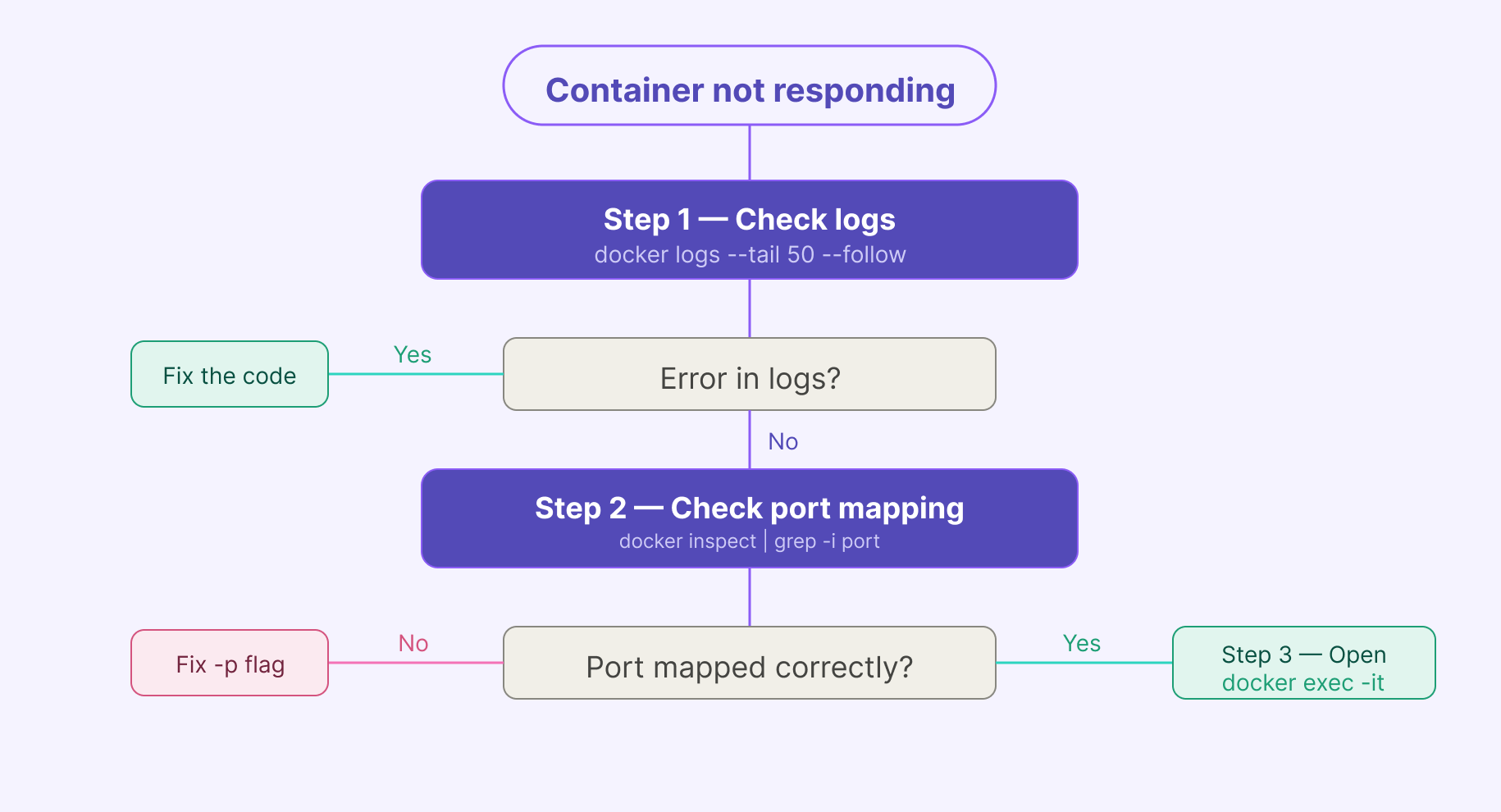
Scenario 1: Your container is running but not responding to requests. How do you debug it?
Start with logs:
docker logs --tail 50 --follow my-containerIf the app started but isn't responding, check port mapping:
docker inspect my-container | grep -i portIf you need to look inside the container:
docker exec -it my-container /bin/shCheck health check status if configured:
docker inspect --format='{{.State.Health.Status}}' my-containerThe answer interviewers want: logs first, network second, shell third. That sequence shows systematic thinking, not guessing.
Scenario 2: Your container works locally, but another container cannot connect to it. What would you check?
This is a networking problem, not an application problem. Work through it in order:
First, confirm both containers are on the same network:
docker network inspect my-networkIf they're on different networks, that's your issue. Containers on separate networks can't reach each other by default. Connect them to the same user-defined network.
Second, check you're using the container name (or service name in Compose) as the hostname, not localhost. Inside a container, localhost refers to the container itself, not to another container on the network.
Third, confirm the target container's application is actually listening on the expected port inside the container:
docker exec -it target-container ss -tlnpNote: ss has replaced the older netstat command on modern Linux systems, and most slim container images don't include netstat at all. If ss isn't available either, you can check from the host with docker port target-container.
Scenario 3: A file exists in your repo, but COPY fails during the build. What would you check?
The most common cause: the file is listed in .dockerignore. Check it first.
cat .dockerignoreSecond, confirm the file path is relative to the build context, not to the Dockerfile's location. If you're running docker build from a parent directory with --file path/to/Dockerfile, your context is the parent directory, not the directory containing the Dockerfile.
Third, check the exact filename. Case sensitivity matters on Linux. Data.csv and data.csv are different files.
# Check what Docker actually sees in the build context
docker build --no-cache --progress=plain . 2>&1 | head -20
Scenario 4: You need to reduce a Docker image from 1.2GB to under 200MB. Where do you start?
Don't start by guessing. Start by understanding what's actually in the image:
docker image history my-imageThis shows which layers are consuming space. Then work through the reduction strategy: switch to a slim base image, add .dockerignore to exclude unnecessary files, and implement a multi-stage build. Steps 1 and 3 together usually account for most of the savings.
Scenario 5: A data pipeline container keeps restarting in production. How do you diagnose it?
Check exit codes and logs first:
docker ps -a                                    # exit codes for stopped containers
docker logs --tail 100 my-pipeline-container
The three most common causes in data pipeline environments:
- OOM kill —
exit code 137means Docker killed the container for exceeding its memory limit. Check withdocker statsand increase the memory allocation. - Dependency not ready — the pipeline is trying to connect to a database that isn't up yet. Fix with a
depends_on: condition: service_healthyin your Compose file. - Application crash — a bad record, unexpected null, or schema change. The logs will show it. Fix the code or add error handling.
The key distinction for interviewers: infrastructure failures (memory, dependencies) and application failures (code bugs, bad data) are diagnosed and fixed differently.
Docker for Data Engineers: What Interviewers Test
Most Docker prep articles are written for DevOps engineers. If you're interviewing for a data engineering or MLOps role, the framing is different, and knowing it gives you an edge.
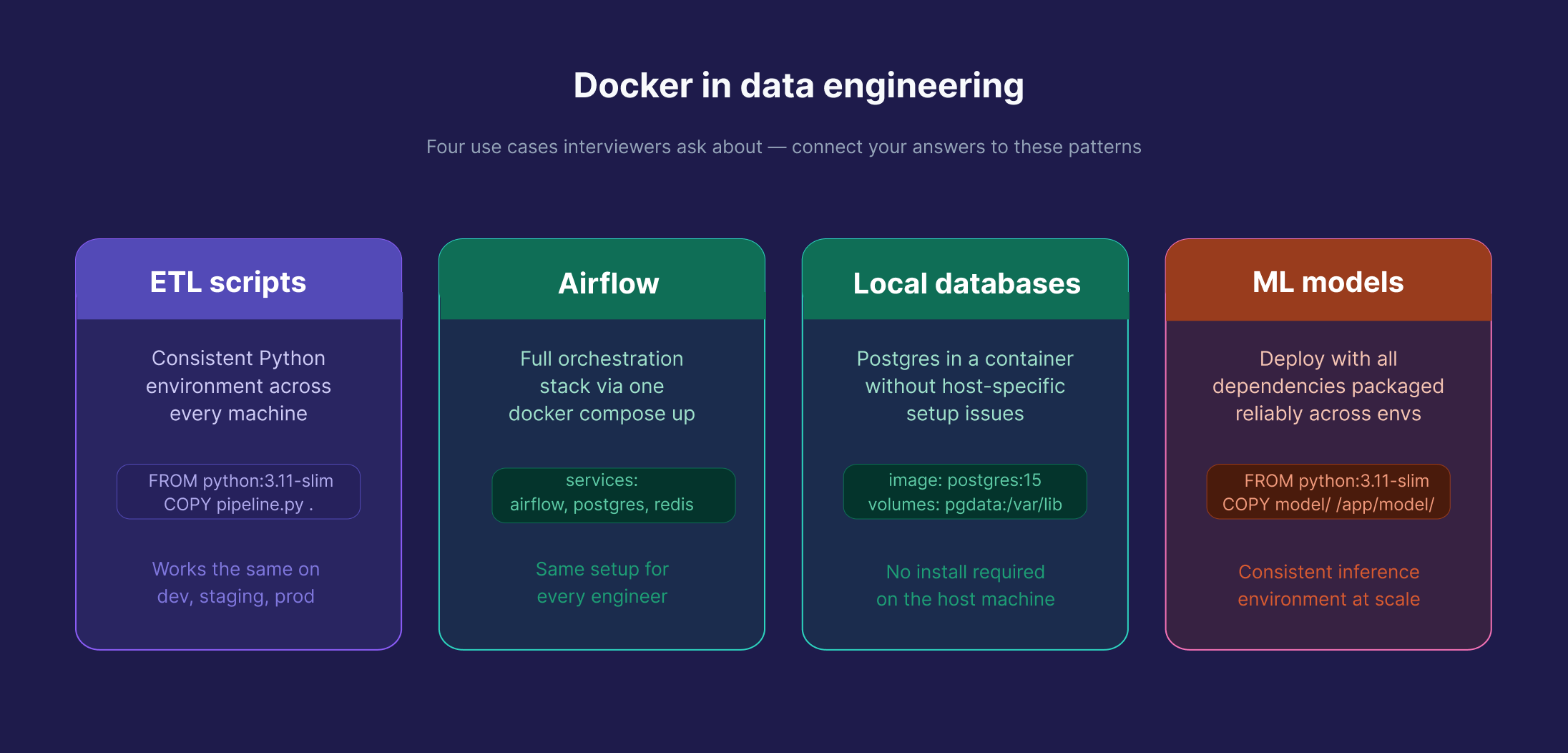
Docker is used throughout data engineering: containerizing ETL scripts for consistent deployments, packaging Airflow environments so every engineer on the team runs the same setup, running Postgres locally in a consistent environment without host-specific setup issues, and deploying ML models reliably across environments. When you're in a data engineering interview, expect questions grounded in these use cases, not generic web server scenarios.
If an interviewer asks you to write a Dockerfile for a Python ETL script, the answer follows the same principles in this guide. But connecting it to pipeline context makes a difference. Mentioning health checks to handle database startup timing, or volumes to persist pipeline state, signals real-world experience. Here's the kind of Compose setup that comes up in data engineering discussions:
services:
  pipeline:
    build: .
    depends_on:
      db:
        condition: service_healthy
    environment:
      - DB_HOST=db
      - DB_PORT=5432

  db:
    image: postgres:15
    environment:
      - POSTGRES_USER=datauser
      - POSTGRES_PASSWORD=datapass
      - POSTGRES_DB=pipeline_db
    volumes:
      - pgdata:/var/lib/postgresql/data
    healthcheck:
      test: ["CMD-SHELL", "pg_isready -U datauser"]
      interval: 10s
      timeout: 5s
      retries: 5

volumes:
  pgdata:
The condition: service_healthy line ensures the pipeline container waits until Postgres is actually ready, a detail that separates candidates who've run real pipelines from those who've only read about them.
Dataquest's Docker Fundamentals course is built around exactly this kind of setup. And the Building Data Pipelines with Apache Airflow course shows how production teams deploy Airflow in Docker. Both are part of the Data Engineer Career Path.
How to Prepare for Your Docker Interview
The candidates who perform best aren't the ones who memorized the most commands. They're the ones who can reason through a problem out loud. That means actually understanding what Docker is doing, not just which flag to use.
Build something real. Containerize a project you've already built. Write the Dockerfile yourself. Watch it break and fix it. That process teaches more than any Q&A list.
Practice explaining your reasoning. Walk through a few scenario questions out loud before your interview. The goal isn't a memorized answer. It's getting comfortable with the diagnostic sequence: what would you check first, why, what would the result tell you.
Be honest about your experience. Junior and mid-level interviewers know you haven't managed a thousand-node cluster. What they're evaluating is whether you understand the concepts well enough to apply them. "I haven't seen that exact scenario, but here's how I'd approach it" is a stronger answer than guessing.
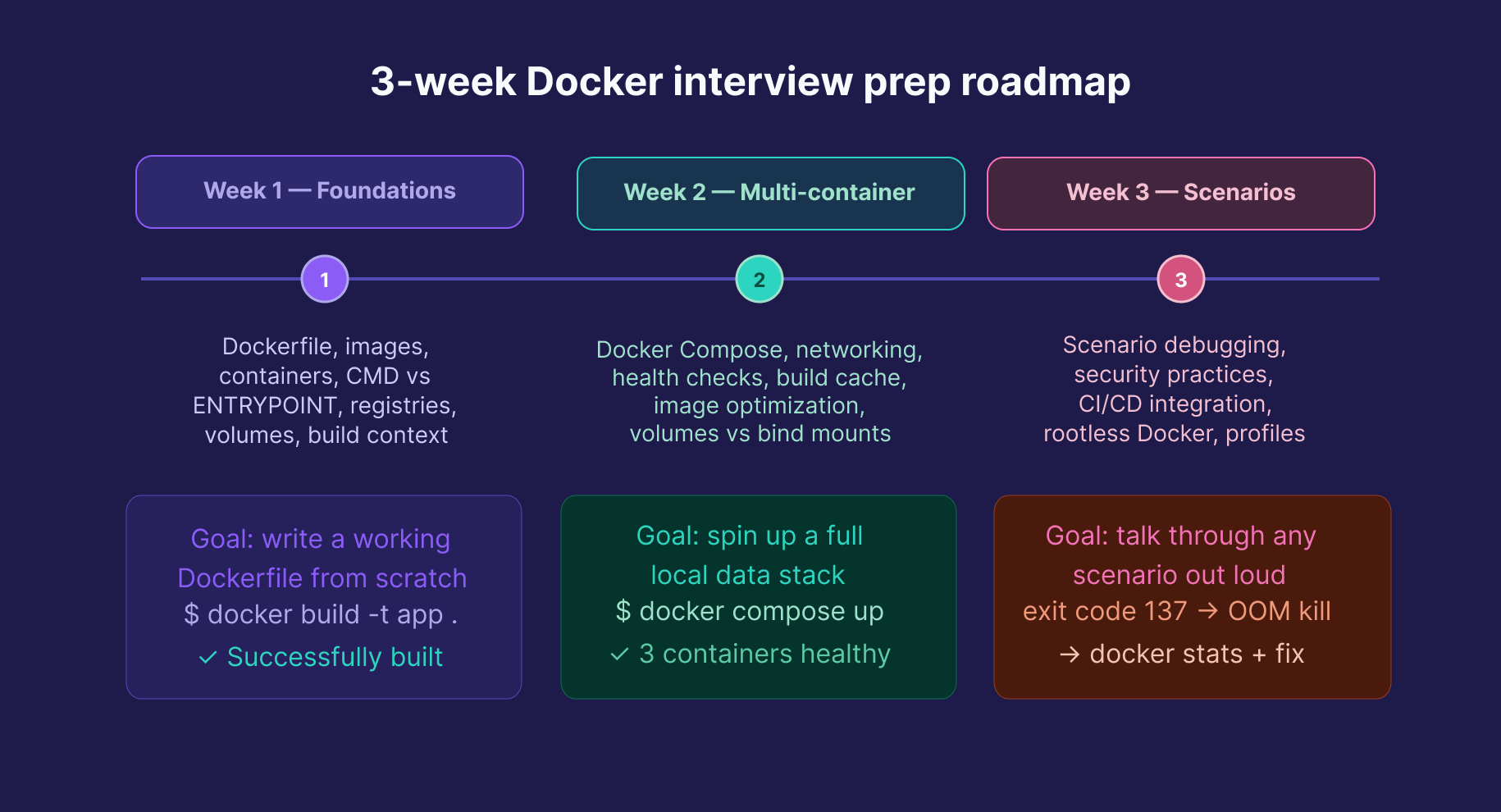
A realistic prep timeline: 2–3 weeks is enough for most junior and mid-level roles. Core concepts and Dockerfile writing in week one, multi-container Compose setups in week two, scenario practice and security topics in week three.
FAQs
How long does it take to prepare for a Docker interview?
For a junior or mid-level role, 2–3 weeks of focused, hands-on practice is realistic.
Start with core concepts, then move to multi-container setups, and finally practice real-world scenarios.
Do I need to know Kubernetes for a Docker interview?
For most data engineering and junior DevOps roles, solid Docker knowledge is enough.
Understanding the difference between Swarm and Kubernetes, and why Kubernetes dominates at scale, is useful context, but deep Kubernetes expertise is only needed if the role specifically asks for it.
What Docker commands should I know for an interview?
You should understand what these commands do and when to use them:
docker build, docker run, docker ps, docker exec, docker logs, docker images, docker rm, docker rmi, docker inspect, docker stats, docker compose up/down, docker network ls, docker volume ls.
You don’t need to memorize every flag — focus on explaining the purpose of each command.
Is Docker used in data engineering?
Yes, widely.
Docker is used to containerize ETL scripts, package Airflow environments, run local databases for development, and deploy machine learning models consistently.
It’s a core skill alongside Python and SQL for data engineers.
Ready to build real containerized pipelines, not just prep for the interview? Dataquest's Docker Fundamentals course covers exactly this, hands-on and project-based, as part of the Data Engineer Career Path. The Building Data Pipelines with Apache Airflow course continues from there, showing how production teams orchestrate pipelines in containerized environments.
Want to read more?
Check out the full article on the original site